

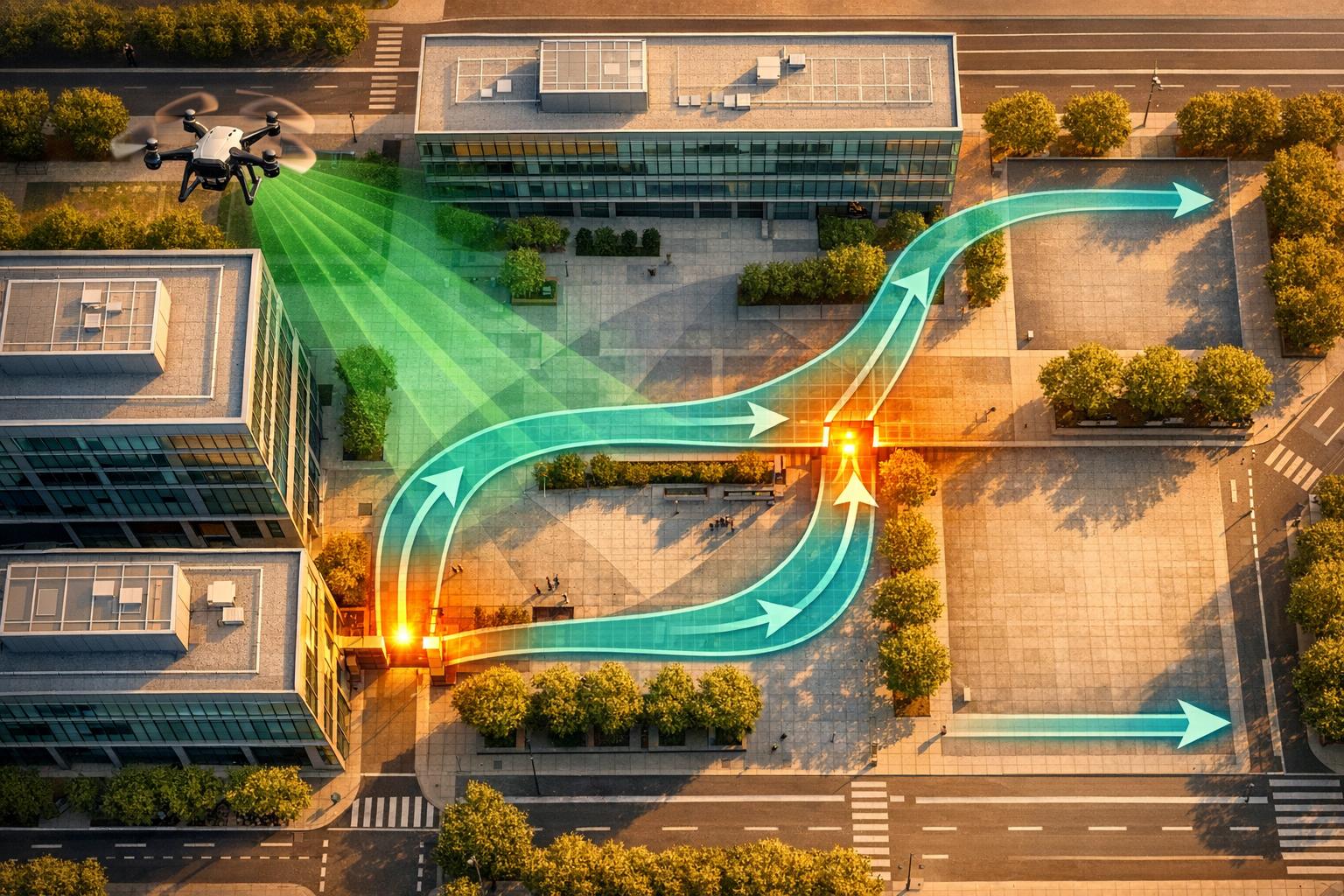
Using drones to simulate evacuation routes can transform emergency planning for industrial sites, warehouses, and large buildings. Traditional methods like floor plans and manual inspections often fail to account for real-time hazards such as blocked exits or smoke-filled stairwells. Drones, paired with tools like digital twins, provide a faster, more precise way to map spaces, test evacuation scenarios, and identify bottlenecks.
Here’s how it works:
- Data Collection: Use drones equipped with LiDAR sensors, thermal cameras, and 360° imaging to gather detailed site data.
- Digital Twin Creation: Platforms like Anvil Labs turn drone data into 3D models, complete with annotations for exits, fire zones, and safe areas.
- Simulation: Populate models with data on population density, hazards, and mobility needs to simulate realistic evacuation scenarios.
- Analysis: Run simulations to test routes, identify congestion points, and optimize evacuation times.
Using Autonomous Drones for Terrain Mapping and Route Creation and Enhance Search and Rescue Ops
sbb-itb-ac6e058
What You Need for Drone-Based Evacuation Simulations
Outfitting your drone flights with the right tools and data is key to turning aerial footage into actionable evacuation strategies.
Choosing the Right Drones for Data Collection
The type of drone you select depends on the specific data you need to gather. For detailed evacuation planning, drones equipped with LiDAR sensors are a must. These sensors provide precise measurements of building layouts and terrain, making them ideal for mapping intricate industrial sites where shadows or reflective surfaces can complicate traditional photography.
Thermal cameras are another essential tool. They can detect heat signatures, helping to identify fire hazards, overheated equipment, or areas where people may gather. For indoor spaces or multi-story buildings, drones with 360-degree imaging are invaluable. They can capture stairwells, corridors, and exits, providing crucial data for modeling how evacuees might move through these spaces.
Once the data is gathered, the next step is processing and annotating your 3D models for further analysis.
Preparing 3D Models and Spatial Data
After collecting your site data, platforms like Anvil Labs can help process and organize it. Anvil Labs supports various data types, including 3D models, orthomosaics, LiDAR scans, and thermal imagery, all in one place. The platform’s tools convert raw footage into accurate digital twins, making it easier to analyze and plan.
To make your spatial data useful, standardized vector symbols should be applied to mark emergency exits, fire extinguishers, and assembly points. This ensures that ground teams can quickly interpret the simulation data. Anvil Labs also offers annotation and measurement tools, allowing you to embed these symbols directly into your 3D models. This creates a clear visual guide that aligns with safety protocols. With cross-device accessibility, your team can review and update these models from anywhere - whether they’re on-site or working remotely from a command center.
The final step involves integrating population and hazard data for a complete simulation.
Gathering Population and Hazard Data
To create realistic evacuation scenarios, it’s essential to combine building data with detailed information about population and hazards. Start with population density data, which shows how many people occupy specific areas - such as departments, work zones, or floors - at different times of the day. This helps you assess whether your exits can handle peak traffic during emergencies.
Include disability data from HR records to account for individuals who may need mobility, visual, or hearing assistance. Your simulation should incorporate buddy systems to ensure these individuals have support during an evacuation.
Hazard data is equally critical. Map out the locations of fire alarms, extinguishers, AEDs, and emergency call boxes throughout your facility. Identify "areas of refuge" in stairwell landings that are accessible for wheelchair users and large enough to serve as temporary safe zones. Finally, define your Evacuation Assembly Areas at least 150 feet away from the building to simulate the full evacuation process. Combining these elements - population patterns and hazard zones - creates scenarios that mirror real-world emergency conditions.
How to Simulate Evacuation Routes Step by Step

4-Step Process for Drone-Based Evacuation Route Simulation
Once you've got your tools and data ready, it's time to dive into the simulation process. This step-by-step guide takes raw drone footage and turns it into a functional evacuation model, showing how people might move through your site in an emergency.
Step 1: Capture Site Data with Drones
Start by collecting data using drones equipped with the right sensors. For LiDAR, use a DJI Matrice 300 RTK paired with the Zenmuse L1, flying at 100–150 feet with 50–70% overlap. This ensures the precise measurements needed for accurate modeling.
For 360° photos, a DJI Mavic 3 Enterprise with an Insta360 camera works well at 200 feet to capture panoramic views. Orthomosaics require a DJI Phantom 4 RTK, flying at 300 feet with 80% front and side overlap. Use the Pix4Dcapture app for flight planning. For thermal imagery, fly at dusk using a FLIR Vue TZ20 on a DJI M600 to detect heat signatures from equipment or fire risks.
Make sure you have LAANC authorization and follow FAA Part 107 regulations, keeping your altitude under 400 feet. Fly in grid patterns at 10–20 mph, keeping wind speeds below 15 mph. Before finishing, confirm that at least 95% of the site is covered.
Step 2: Build a Digital Twin in Anvil Labs
Once your site data is collected, upload it to Anvil Labs to create a digital twin. The platform supports multiple file types, including LiDAR files (.las), 360° photo sequences (.jpg), orthomosaics (.tif), and thermal imagery (.tiff). Use the platform's tools to process this data into a unified 3D model. For precise alignment, apply georeferencing with ground control points, aiming for accuracy within one inch.
Customize the model by adding annotations. For example, mark fire zones with red polygons and evacuation paths with green lines. Anvil Labs allows your team to view and interact with the model from any device, whether they're onsite or remote. Updates made in real-time sync across all devices, ensuring seamless collaboration.
Step 3: Model Evacuation Scenarios
Using the digital twin, you can start designing evacuation routes. Define agents in Anvil Labs with specific parameters like walking speeds (3–5 feet per second for adults and 2–4 feet per second for elderly individuals), group sizes (1–10 people), and a panic factor (ranging from 0.2–0.8 to simulate stress). Set population density based on real data, typically 1–5 people per 100 square feet.
To map out routes, use visibility graphs to connect key nodes like exits and safe zones, while avoiding obstacles identified in the 3D model. Run graph algorithms to find the shortest paths. Incorporate Voronoi diagrams to divide spaces into regions equidistant from hazards and exits, prioritizing corridors wider than 4 feet. This approach speeds up calculations by 40% compared to manual methods.
When your scenarios are ready, you can move on to running simulations and analyzing the results.
Step 4: Run Simulations and Analyze Results
Set up your simulation parameters. For example, run 10–50 simulations with varying conditions, such as fire spreading at 10 feet per minute or smoke reducing visibility to 50 feet. Test staggered start times (from 0–300 seconds) and adjust agent counts (50–500 individuals).
Use the dashboard to analyze results. Heatmaps can show areas of high density, such as spots where more than 10 people occupy 100 square feet. Evaluate the 90th percentile evacuation time - aim for under 4 minutes. Identify choke points using trajectory plots that highlight congestion. After each round, export detailed reports with annotations for team review. Iterate 3–5 times to refine your routes, often achieving a 20% reduction in evacuation time with each cycle.
Best Practices for Accurate Evacuation Simulations
Validate Simulations with Ground Teams
The effectiveness of your evacuation simulation depends on how well it mirrors real-world conditions. Once you've run your models, it's essential to send ground teams to physically walk through the routes and verify the results. This hands-on approach helps uncover any gaps between the simulation and actual conditions, like unexpected obstacles or terrain features that drone data might miss. Start by comparing the basic layout, then test under real environmental conditions to ensure accuracy. Ground teams should also cross-check simulated sensor data - such as GPS, LiDAR, and inertial navigation systems - against field measurements. This step ensures the simulation aligns with reality. Before heading into the field, adjust control parameters and test how the simulation handles obstacles virtually to streamline the process.
Once you've confirmed the simulation's accuracy, move on to refining the routes with advanced optimization techniques.
Optimize Routes with Advanced Algorithms
With validated routes in hand, it's time to fine-tune them using advanced algorithms. These tools analyze multiple route variations, tweaking factors like corridor widths, exit assignments, and path layouts to reduce overall evacuation times. Key parameters, such as door widths, stairwell capacities, and assembly point locations, should also be evaluated to enhance efficiency. It's equally important to simulate challenging scenarios, like equipment failures or blocked exits, to ensure your evacuation plan can handle unexpected situations.
After optimizing the routes, collaboration among teams becomes vital for further refinement and implementation.
Use Anvil Labs for Team Collaboration and Review
Once you've validated and optimized your evacuation routes, effective collaboration is the next step to finalize the simulation data. Validated simulations become the foundation for team reviews, where real-time updates can enhance the overall plan even further.
Anvil Labs simplifies this process by offering a shared 3D model that team members can access across devices. Its secure sharing options allow you to involve external consultants or emergency responders without risking sensitive information. Plus, its cross-device compatibility makes on-site reviews more efficient, enabling direct comparisons between the digital twin and the physical environment.
Conclusion
Using drones to simulate evacuation routes is changing the way industrial sites and facilities handle emergency planning. By gathering detailed aerial data, creating digital twins, modeling various scenarios, and running simulations, evacuation plans are built on actual site conditions instead of assumptions. This approach slashes planning time from weeks to just days, while also uncovering hazards and bottlenecks that traditional methods might overlook.
The combination of drone technology and spatial analysis tools leads to noticeable improvements. For example, industrial sites utilizing drone simulations have seen evacuation times drop by 25–40% in simulations due to optimized routes, along with a 30% increase in hazard identification during the planning stages. These improvements mean safer and quicker evacuations when real emergencies strike.
Anvil Labs offers a scalable and collaborative way to implement this process. With support for LiDAR, thermal imaging, and 3D modeling, their platform ensures your digital twin mirrors actual site conditions. Annotation tools and secure sharing features allow teams to collectively review and validate routes, while cross-device access lets ground teams compare digital plans with physical environments during field checks, helping to spot and resolve discrepancies early.
For those just starting with drone-based simulations, it’s a good idea to begin small. Try a pilot project focused on a single building or zone using a budget-friendly drone and Anvil Labs’ $49/project hosting plan. Measure key metrics like route clearance times and bottleneck points, then gradually expand to larger areas as you fine-tune your methods. The insights you gather will lay the groundwork for proactive planning that could make all the difference in an emergency.
This shift from manual surveys to drone-powered simulations isn’t just about saving time - it’s about creating evacuation plans that can be tested, validated, and improved long before lives are at stake.
FAQs
Do I need FAA Part 107 to do this?
Whether or not you need FAA Part 107 certification depends entirely on how you plan to use your drone. If you're using it for professional or commercial purposes, such as capturing footage for a business or performing complex tasks like simulating evacuation routes, certification is usually required.
Additionally, flying in restricted airspace or conducting BVLOS (Beyond Visual Line of Sight) operations demands proper authorization under FAA regulations.
On the other hand, if you're flying purely for recreational or hobbyist purposes, Part 107 certification may not be necessary. That said, it's crucial to follow all FAA rules that apply to your specific activities to ensure you're operating within legal boundaries.
What building data should I add beyond the drone scan?
To enhance the value of drone scan data, combine it with in-depth building information, such as structural details, asset records, and unique site features. Incorporate high-resolution 3D models, orthomosaics, and point clouds generated through photogrammetry or LiDAR to develop precise digital twins. Including additional data - like building layouts, infrastructure specifics, hazard assessments, and elevation models - can significantly improve the accuracy and dependability of evacuation route simulations.
How do I verify the simulation matches reality?
To make your drone simulation as accurate as possible, compare the generated models with real-world reference data. Incorporate Ground Control Points (GCPs) to align your models with actual geographic coordinates. Use checkpoints to verify the precision of your results. It's also crucial to conduct regular quality checks - look for any alignment problems and ensure the data is both complete and consistent. These steps will help confirm the reliability of your simulation.

.svg)


