

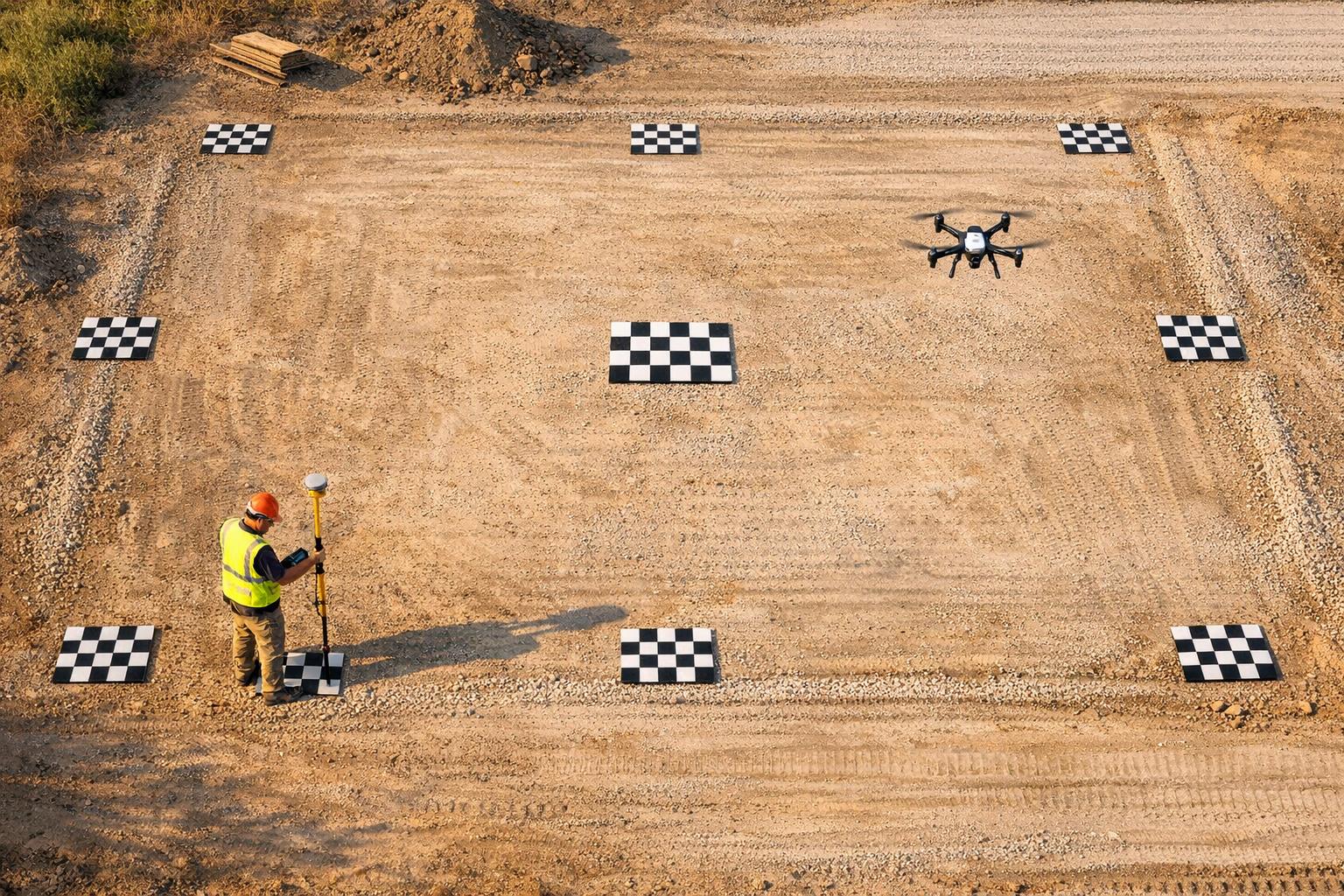
Drone GPS alone isn’t precise enough for tasks requiring accuracy, like construction layouts or land surveys. Ground Control Points (GCPs) solve this by anchoring drone imagery to exact coordinates, ensuring precision down to centimeters. Here’s what you should know:
- GCP Basics: Use at least 4 GCPs for basic accuracy. For medium projects, 5 GCPs (corners + center) work best. Larger or uneven terrains may need 10+ strategically placed GCPs.
- RTK/PPK Drones: These advanced drones reduce GCP needs. Use 1 GCP per 200 images, but still include 1–2 checkpoints for validation.
- Placement Tips: Place GCPs on flat, stable surfaces (e.g., asphalt). Avoid obstructions like trees or tall buildings. Include GCPs at high and low elevations for hilly areas.
- Validation: Checkpoints verify map accuracy. Use 4–5 evenly distributed checkpoints for professional results.
Proper GCP setup and validation ensure your maps align with project standards. Keep reading for detailed guidance on placement, equipment, and validation.

Ground Control Points Requirements Guide for Drone Mapping
How To Create Accurate Maps With GCP's - Drone Mapping Tutorial
sbb-itb-ac6e058
How Many Ground Control Points Do You Need?
The number of ground control points (GCPs) you'll need depends on factors like the project's size, the terrain, and the capabilities of the drone you're using. While requirements can vary, these guidelines offer a solid starting point.
Standard GCP Quantities
For non-RTK/PPK drones, you'll need at least 4 GCPs to achieve basic spatial accuracy. For medium-sized projects, it's best to use 5 GCPs - one near each corner and another in the center. This arrangement helps maintain accuracy across the entire map and avoids boundary distortions. It's also essential to position GCPs so each one is visible in separate images, preventing clustering.
For larger projects, about 10 GCPs will usually be sufficient to deliver high global accuracy. The focus here should be on strategic placement rather than simply increasing the number of GCPs.
If you're working on uneven terrain - such as hilly or valley-filled areas - make sure to place a GCP at each significant elevation point. For sites with dramatic elevation changes, like mining operations, this approach ensures consistent vertical accuracy and minimizes distortions in height measurements.
If you're using advanced drone technology, RTK/PPK systems can significantly adjust these GCP requirements.
Reducing GCPs with RTK-Enabled Drones
RTK (Real-Time Kinematic) and PPK (Post-Processing Kinematic) drones offer centimeter-level accuracy for image geotagging, which means you can reduce the number of GCPs needed. For non-RTK drones, the general rule is about 1 GCP for every 60 images, while RTK/PPK drones only require 1 GCP for every 200 images.
"For non-RTK/PPK drones, you should use 1 GCP for every 60 drone images, while RTK/PPK enabled drones require 1 GCP for every 200 images." - Jessica May, DroneBundle
While RTK workflows can technically operate without GCPs, it's still a good idea to use 1-2 checkpoints for validation. These checkpoints don't affect the processing itself but serve as an independent way to verify the precision of your map, ensuring the RTK system is functioning properly.
Where to Place Ground Control Points
Distribution Patterns
For medium-sized sites, it's effective to use a "corners and center" layout: one Ground Control Point (GCP) at each corner of the area and one in the center. This five-point setup ensures even coverage and reduces distortions at the edges of the map. If you're working on a larger site, expand this layout into a grid pattern, ensuring the points are evenly spaced rather than grouped together.
When placing GCPs near the edges of the flight area, maintain a buffer of 50–100 feet. This ensures the drone captures overlapping images of each marker. Additionally, keep the distance between GCPs no greater than 1,312 feet (400 meters). This spacing allows mapping software to interpolate accurately between points.
"If you can see more than one GCP in an image, they are too close together." - DroneDeploy Team
Don't forget to account for terrain elevation when deciding on marker locations.
Handling Terrain and Elevation Changes
Include at least one GCP at both the highest and lowest elevation points. In areas with significant elevation variations - like hills, valleys, or mining sites - place markers at key elevation levels. For best results, position markers on flat surfaces such as asphalt, concrete, or packed earth. Avoid uneven areas like tall grass, which can reduce vertical accuracy and make it harder for software to locate the marker's center.
Avoiding Obstacles and Clustering
After considering elevation, ensure markers are free from obstructions that could interfere with drone visibility or GPS signals. Avoid placing GCPs near trees, tall buildings, power lines, or overhangs, as these can block the drone's view in aerial images. Similarly, environmental factors like heavy shadows, glare, or snow can impact marker visibility.
Steer clear of areas with parked vehicles or dense vegetation that might shift between flights. By carefully selecting marker locations, you can ensure precise data capture and reliable results for your mapping project.
Recording Accurate GPS Measurements
Once you've placed your markers, the next step is to accurately capture their coordinates. Surprisingly, many mapping projects fall short, not because of marker placement, but due to using the wrong equipment for recording GPS data.
GPS Equipment Options
For precise ground control work, professional GPS receivers equipped with Real-Time Kinematic (RTK) or Post-Processing Kinematic (PPK) capabilities are essential. These systems provide the centimeter-level accuracy needed for tasks like surveying or construction. Brands like Trimble and Leica are industry leaders, known for delivering highly accurate results.
On the other hand, using consumer devices like phones or tablets to record Ground Control Point (GCP) coordinates is not advisable. These devices typically offer meter-level accuracy, which is about the same as a drone's onboard GPS. This level of precision can introduce errors of several meters, completely undermining the purpose of using GCPs.
| Equipment Type | Accuracy Level | Recommended Use Case |
|---|---|---|
| RTK/PPK GPS Receiver | Centimeter-level | Professional surveying, construction, volumes |
| Drone Onboard GPS | Meter-level | General visual inspection, non-precise mapping |
| Phone/Tablet GPS | Meter-level | Not recommended for GCP recording |
With the right equipment selected, it's crucial to ensure your GPS system is properly configured and calibrated.
GPS Setup and Calibration Procedures
To avoid alignment issues, confirm that your GPS device is set to the correct Coordinate Reference System (CRS) and EPSG code. For most drone mapping projects, WGS84 (EPSG: 4326) is the standard choice. A mismatch between your GPS device and mapping software can result in data misalignment, no matter how precisely markers are placed.
When collecting data, position the GPS receiver in open areas to reduce signal interference from buildings or trees. Place the rover pole directly at the center of your GCP marker on a stable, flat surface like asphalt or concrete. Double-check that your GPS settings align with the project requirements before beginning data collection. Proper setup and calibration are key to ensuring accurate results.
Using Checkpoints to Validate Your Data
Once you've recorded all your Ground Control Point (GCP) coordinates, the next step is to validate your results using checkpoints. These checkpoints are a crucial part of ensuring your mapped data is accurate. Think of them as your quality control tool for verifying the integrity of your mapping process.
GCPs vs. Checkpoints
At first glance, checkpoints might look just like GCPs. They both use high-contrast markers and GPS measurements. However, their roles are entirely different. While GCPs help your mapping software align and "warp" the map into the correct position, checkpoints are deliberately left out of the processing. This intentional exclusion allows them to serve as an unbiased way to measure your map's accuracy.
"Checkpoints act as independent validation points. They are located throughout your map but are excluded from the processing set used to orient the map. This allows you to measure the difference between the map's calculated position and the actual measured location on the ground." - DroneDeploy
In simple terms, GCPs act as the foundation for your map, while checkpoints are the tools you use to confirm how precise that foundation really is. By comparing the GPS location of a checkpoint to its position on the processed map, you can assess the overall accuracy of your project.
Here's a quick breakdown of the differences between GCPs and checkpoints:
| Feature | Ground Control Point (GCP) | Checkpoint |
|---|---|---|
| Primary Role | Anchors the map for global accuracy | Provides a metric for quality control |
| Data Usage | Included in processing to align the map | Excluded from processing, used only for validation |
| Minimum Needed | At least 4 for non-RTK maps | 1 per map minimum; 4–5 for high-precision needs |
Now that you understand their differences, let's talk about how many checkpoints you need and where to place them for the best results.
How Many Checkpoints and Where to Place Them
For accurate validation, plan to allocate 10–20% of your surveyed points as checkpoints. If you're using RTK- or PPK-enabled drones, you can get by with fewer - 1 or 2 checkpoints will confirm global accuracy. However, for professional-grade projects, aim for 4–5 checkpoints to ensure a stronger validation.
Placement is just as important as quantity. Distribute checkpoints evenly across your project area, covering not only the center but also the edges and corners. If your site includes varying elevations, make sure to place checkpoints at both the highest and lowest points to check vertical accuracy. Avoid placing checkpoints too close to GCPs - this helps identify any spatial drift or errors in areas that aren't directly anchored.
Conclusion
Maintaining accurate control points is a cornerstone of creating precise maps. Without them, your map's global accuracy could be off by several meters, as it would rely solely on your drone's internal GPS system. Achieving reliable survey results starts with careful planning, proper placement, and thorough validation of control points.
Use at least 4 ground control points (GCPs) strategically distributed across your survey area, ensuring they’re placed on stable surfaces like asphalt or concrete. If your site has varying elevations, make sure to position GCPs at both the highest and lowest points to capture those changes effectively.
Checkpoint validation is equally important. Even when using advanced RTK or PPK drones, include 1–2 checkpoints to verify your map’s global accuracy. These checkpoints act as independent references, giving you confidence that your final data meets the precision standards your project requires.
FAQs
How do I know if I need GCPs at all?
If your project doesn’t demand high precision, or you’re using RTK/PPK systems capable of achieving centimeter-level accuracy, you might not need Ground Control Points (GCPs). However, GCPs become essential for tasks like construction projects, terrain modeling, or volumetric calculations, where aligning data with real-world coordinates is critical. For smaller areas or when working with reliable RTK/PPK systems, GCPs may be optional but can still enhance data accuracy and serve as a validation tool.
What size and type of GCP marker should I use?
Opt for large, high-contrast markers that measure at least 12 inches (30 cm) to make them easily visible in drone images. Go for durable markers with clear, unique patterns like painted targets or QR codes, and position them on flat, stable surfaces. To ensure pinpoint accuracy, survey the markers using RTK or PPK GPS for precise coordinates.
What accuracy should I expect from checkpoints?
When checkpoints are accurately positioned and measured using RTK (Real-Time Kinematic) or PPK (Post-Processed Kinematic) systems, they typically reach an accuracy level of 2-5 cm. This level of precision is crucial for ensuring dependable data in drone mapping projects.

.svg)


